
Fix Unsupported TKR in NAPP Deployment

If you have deployed NSX Application Platform (NAPP) using the latest version of NAPPA (NSX Application Platform Automation Appliance) and upon completion of the deployment you notice that the Guest Cluster supporting the NAPP solution is on a TKR (Tanzu Kubernetes release) version of v1.23.8, this post is for you, and I will explain how to resolve it in under 3 minutes.

Pasted image 20241008204215.png

Well, if you’re here, it’s because you’ve already realized that even though you’re using the latest version of NAPPA, it is deploying the Guest Cluster in an unsupported version (v1.23.8).

Pasted image 20241009201638.png
Pasted image 20241009201659.png

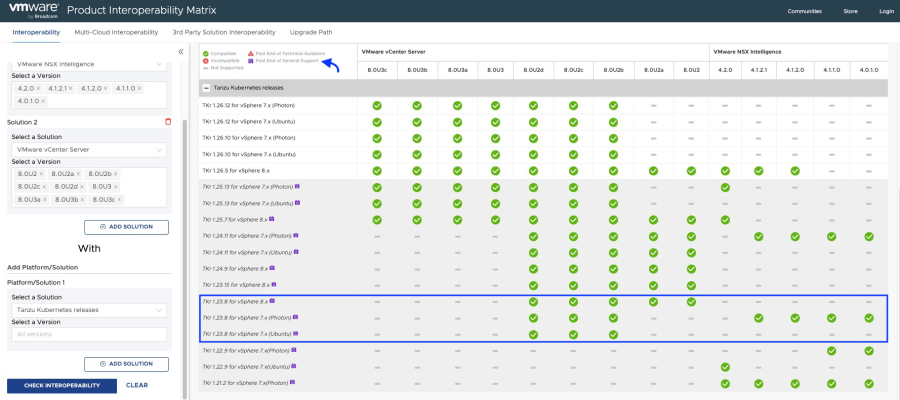
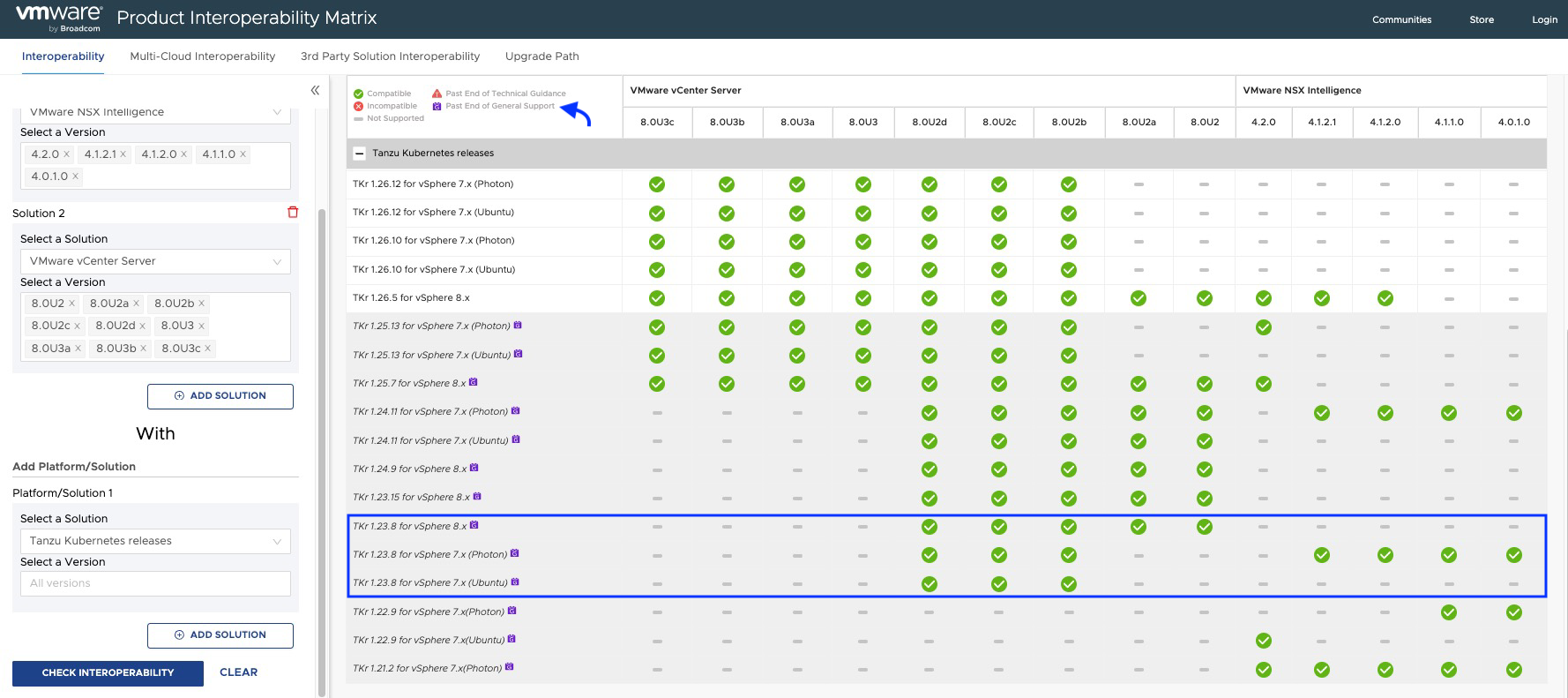
The bad news is that it is a reported issue with the NAPPA tool (version 4.2), which, although it has three images of TKR incorporated and loads them into the content library, ends up choosing version v1.23.8 instead of v1.27.6, even though both were shown as COMPATIBLE.

Pasted image 20241008210538.png

Solutions

At this point, you have two options: update from TKR v.1.23.8 until you reach at least v1.26.5, although I would recommend going for v.1.27.6. I will be posting an article for that update soon, so don’t miss it!

The other option, which is smarter and requires less effort, is to remove the deployment using the CLEANUP function of NAPPA to redeploy it while keeping in mind some considerations that I will explain later.

If you decided to remove the deployment, go to NSX Application Platform Automation Appliance, proceed next to the wizard until you reach the end. This is where your deployment should have finished; start from the last stage of deployment > Deploy NAPP and click on CLEANUP.

Pasted image 20241010184546.png

Note: If you had already activated any NAPP service with NSX Intelligence, go to the NSX graphical interface and click on remove that service; otherwise, it will not let you delete the deployment. Once the service is removed, it should look like the following image.

Pasted image 20241010190039.png

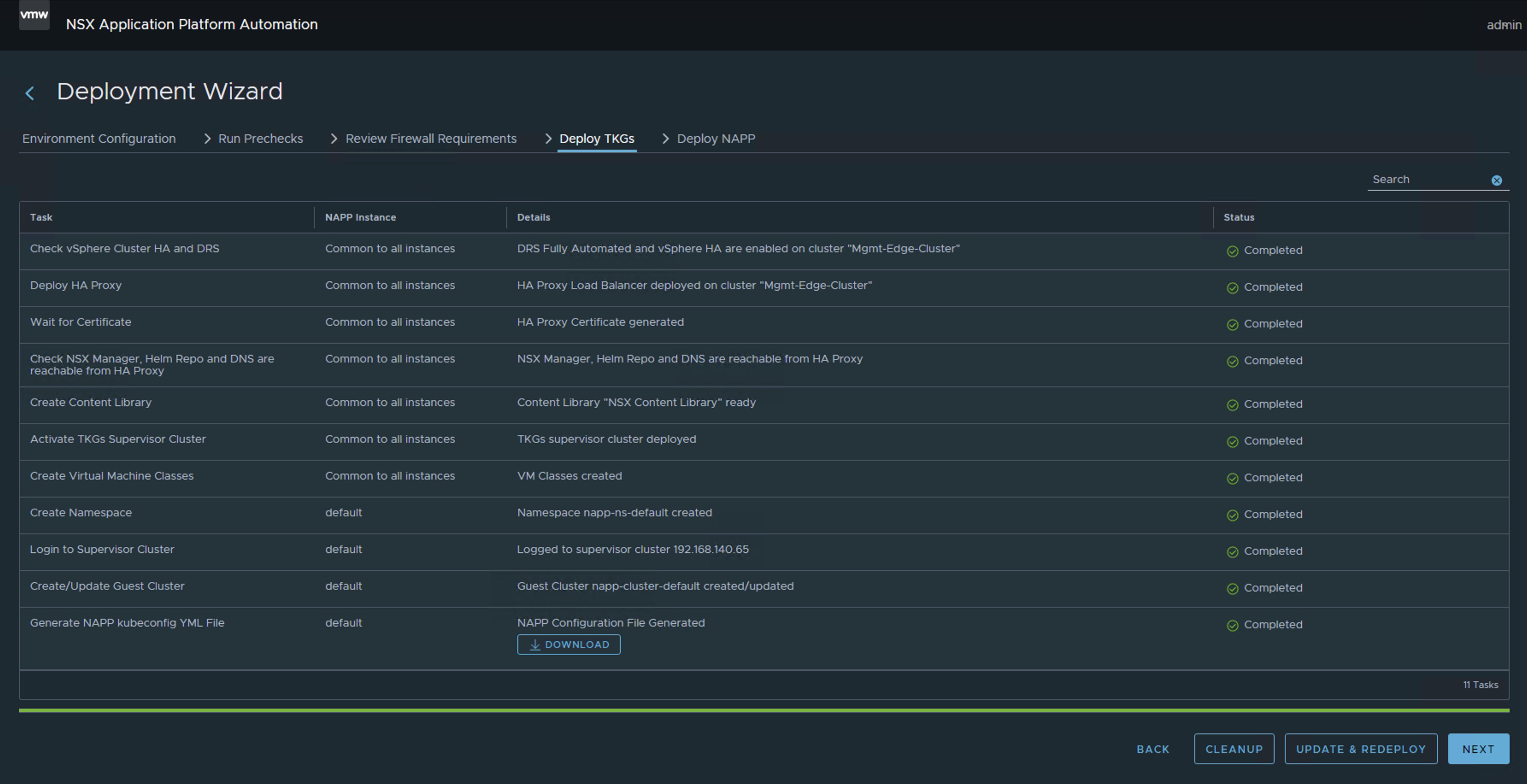
After doing the same (CLEANUP) in the Deploy TKGs stage. This will remove the deployment of NAPP and vSphere With Tanzu from your environment to simply redeploy it.

WARNING! Do this only if you have deployed vSphere With Tanzu using the NAPPA and only for the purpose of the NAPP.
Pasted image 20241010184646.png

At this point, you have only made a couple of clicks to remove the deployment, which is why it is my preferred option.

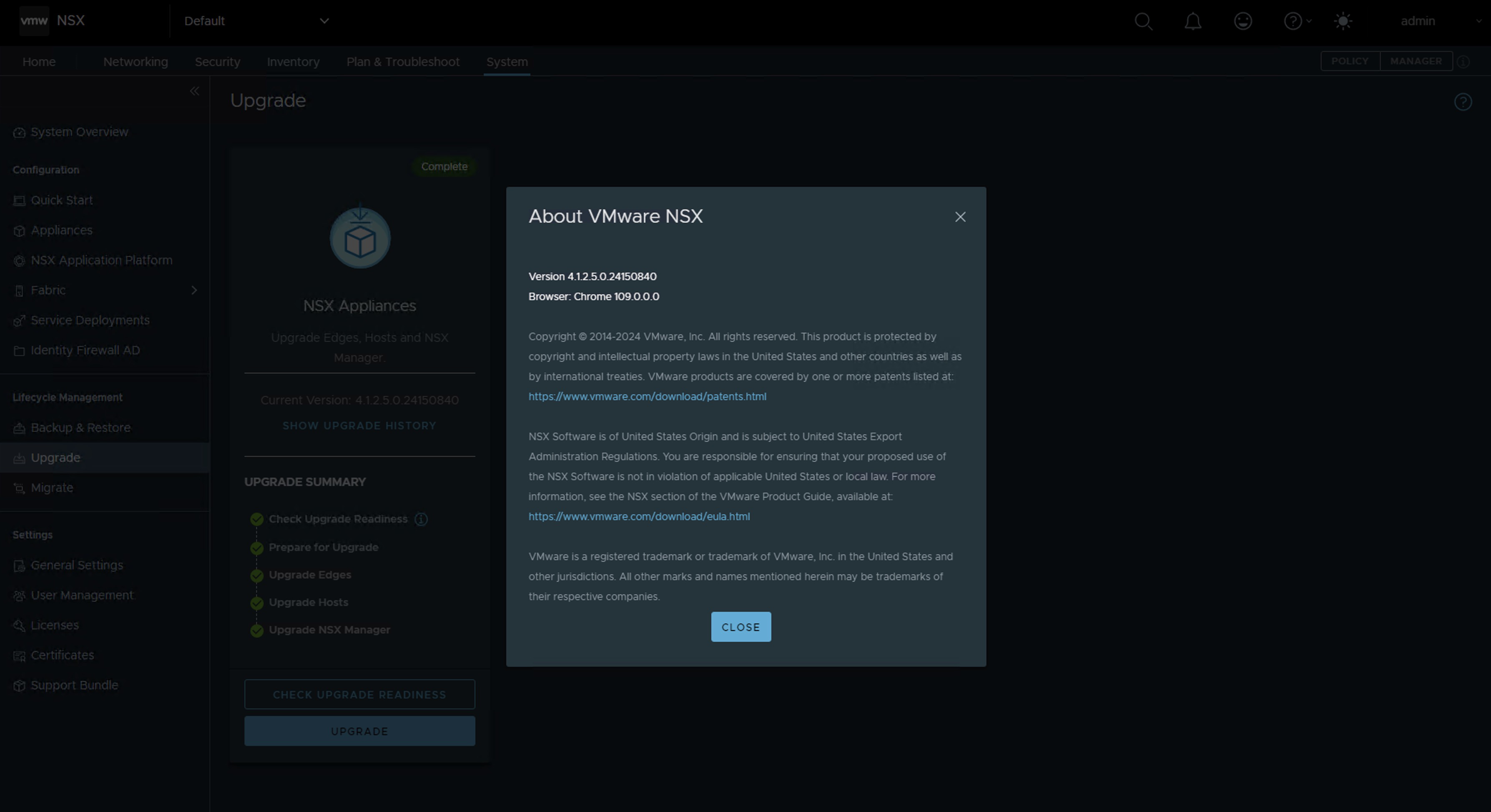
Now you just need to update NSX to version 4.1.2.2 or higher and relaunch the NAPP. This update is very straightforward; moreover, it will help you to get rid of one or two vulnerabilities that you might have in the environment.

In my case, I upgraded from NSX version 4.1.2.1 to version 4.1.2.5.
Pasted image 20241010002049.png

Here you just need to restart the NAPPA assistant from the beginning; the good news is that all the data is already preloaded, you just have to re-enter a couple of passwords.
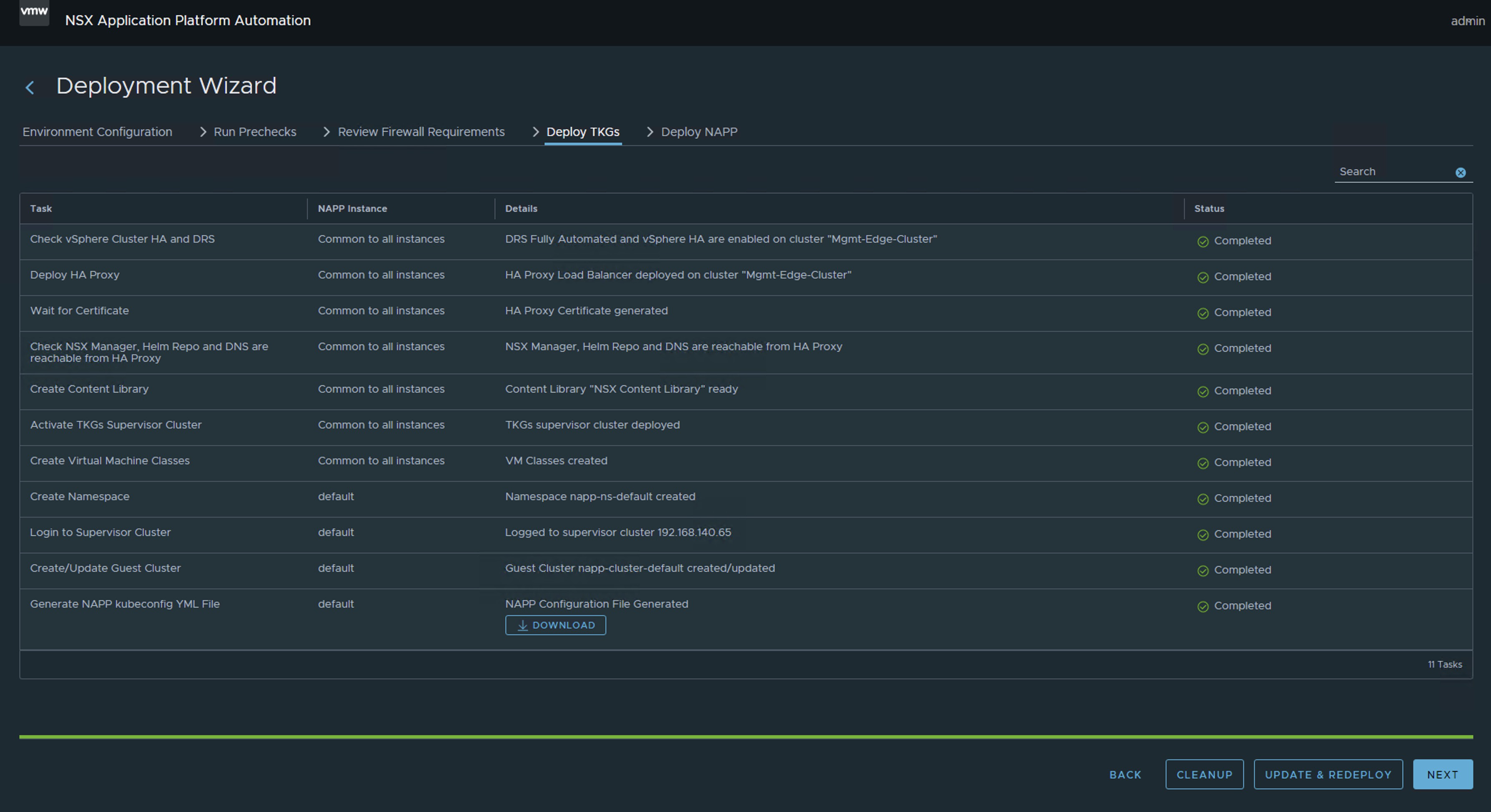
Pasted image 20241010092327.png
Pasted image 20241010190724.png

If all has gone well, you should now have the Guest Cluster deployed that supports the NSX Application Platform (NAPP) in the supported and compatible version (v1.27.6).

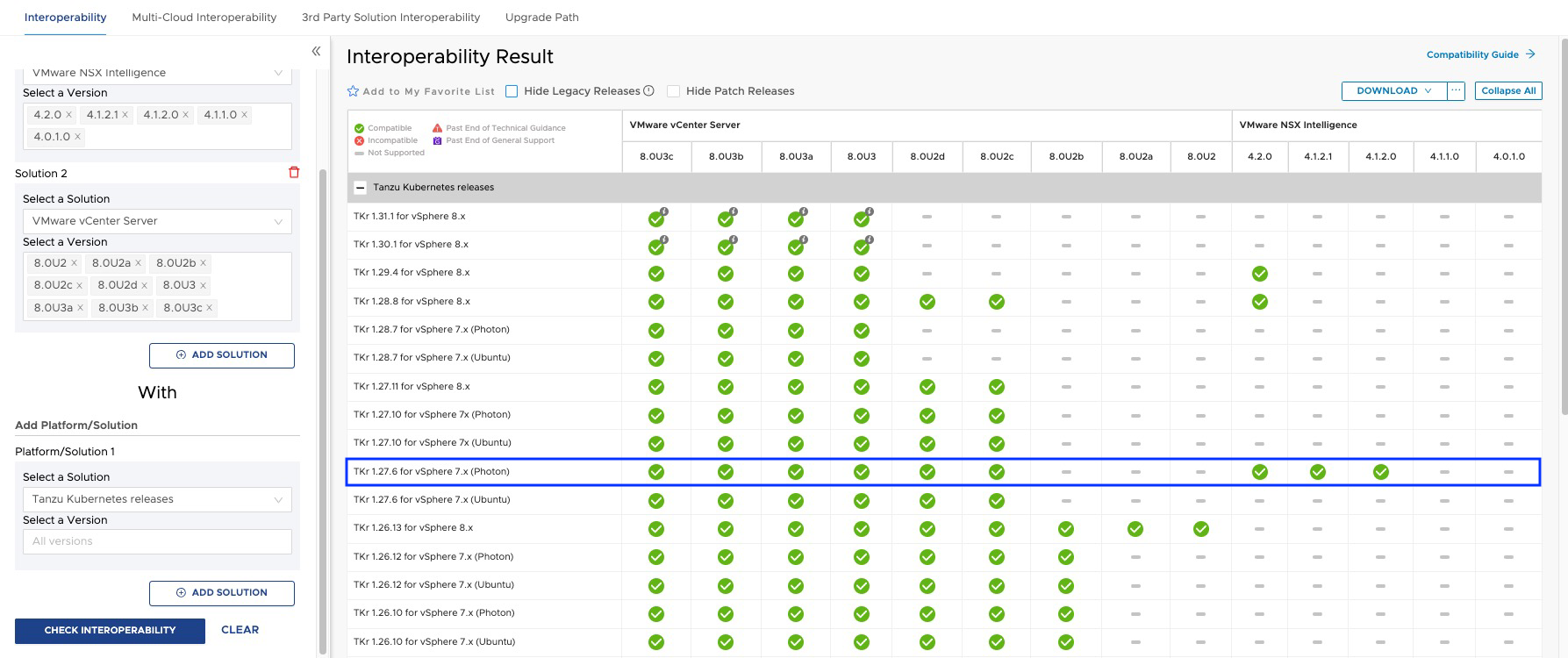
Pasted image 20241010092517.png
Pasted image 20241018195240.png

And that’s all, friends! With this, we confirm that when we have a version of NSX higher than 4.1.2.2, the guest cluster is deployed with version v1.27.6.

ALL VM NAMES USED IN THIS BLOG ARE FICTITIOUS AND RELATE TO A CUSTOM LAB ENVIRONMENT USED FOR STUDY PURPOSES.

IMPORTANT! I have migrated the blog from the domain nachoaprendevirtualizacion.com to nachoaprendeit.com. If you found this article helpful, please give it a Like and share it with your colleagues; these actions will help me optimize search engines to reach more people.

Solución a TKR incompatible después del despliegue de NSX Application Platform

Si estas desplegado NSX Application Platform (NAPP) utilizando la ultima versión de NAPPA (NSX Application Platform Automation Appliance) y al finalizar el despliegue vez que el Guest Cluster que soporta la solución de NAPP esta en una versión de TKR (Tanzu Kubernetes release) v1.23.8. Este post es para ti, y te explico en menos de 3 minutos como solucionarlo.

Pasted image 20241008204215.png

Pues bien, si estas acá es porque ya te diste cuenta que aunque estas usando la última versión del NAPPA, te esta desplegando el Guest Cluster en una versión fuera de soporte (v1.23.8).

Pasted image 20241009201638.png
Pasted image 20241009201659.png

La mala noticia es que es un issue reportado de la herramienta NAPPA (versión 4.2), que aunque tiene incorporadas tres imágenes de TKR y las carga en la librería de contenido, termina eligiendo la versión v1.23.8 y no la v1.27.6, aunque las dos se mostraban como COMPATIBLE.

Pasted image 20241008210538.png

Soluciones

En este punto tienes dos opciones, hacer actualizaciones desde la TKR v.1.23.8 hasta llegar mínimo a la v1.26.5 aunque yo recomendaría mejor la v.1.27.6. Estaré publicando un post para esa actualización. Así que, ¡No te lo pierdas!

O la otra opción, más inteligente y con menos esfuerzo, es eliminar el despliegue usando la función de CLEANUP del NAPPA para volverlo a lanzar teniendo algunas consideraciones que te explico más adelante.

Si decidiste eliminar el despliegue, ve a NSX Application Platform Automation Appliance, next a el wizard hasta llegar al final, aquí fue donde debió haber terminado tu despliegue, comienza por la última etapa del despliegue > Deploy NAPP y clic en CLEANUP

Pasted image 20241010184546.png

Nota: Si ya habías activado algún servicio del NAPP con NSX Intelligence, ve a la interface gráfica de NSX y haz clic en eliminar a ese servicio, de lo contrario no te va dejar eliminar el despliegue. Una vez eliminado el servicio, debe lucir como en la siguiente imagen.

Pasted image 20241010190039.png

Después hacer lo mismo (CLEANUP) en la etapa Deploy TKGs. Esto eliminará el despliegue de NAPP y vSphere With Tanzu de tu ambiente para simplemente volver a lanzarlo.

¡OJO! Hacer esto solo si has desplegado el vSphere With Tanzu usando el NAPPA y solo para el propósito del NAPP.

Pasted image 20241010184646.png

En este punto solo has hecho un par de clics para eliminar el despliegue, por eso es mi opción preferida.

Ahora solo tienes que hacer un update de NSX a la version 4.1.2.2 o superior y volver a lanzar el NAPP. Esta actualización es muy sencilla, además te va a ayudar a librarte de una que otra vulnerabilidad que puedas tener en el ambiente.

En mi caso pasé de la versión de NSX 4.1.2.1 a la version 4.1.2.5

Pasted image 20241010002049.png

Aquí ya solo debes volver a lanzar el asistente del NAPPA desde el principio, la buena noticia es que todos los datos ya aparece precargados, solo tienes que reingresar un par de passwords.

Pasted image 20241010092327.png
Pasted image 20241010190724.png

Si todo ha salido bien, deberías tener ahora desplegado el Guest Cluster que soporta la solución de NSX Application Platform (NAPP) en la versión soportada y compatible (v1.27.6).

Pasted image 20241010092517.png
Pasted image 20241018195240.png

¡Y eso es todo amigos! Con esto comprobamos que, cuando tenemos una versión den NSX superior a 4.1.2.2. El guest cluster se despliega con la versión v1.27.6.

TODOS LOS NOMBRES DE VMS USADOS EN ESTE BLOG SON INVENTADOS Y OBEDECEN A UN AMBIENTE DE LABORATORIO PROPIO, UTILIZADO PARA FINES DE ESTUDIO.

¡IMPORTANTE! He migrado blog del dominio nachoaprendevirtualizacion.com a nachoaprendeit.com. Si te ha servido este artículo deja tu buen Like y compártelo con tus colegas, estas aciones me ayudarán a optimizar los motores de búsqueda para llegar a más personas.